TouchBSS Utility
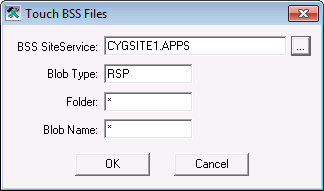
The TouchBSS utility is for updating the timestamps of files stored in a BSS. This utility is generally used with a version management task. Timestamps can be updated based on file type, application group, or name.
The TouchBSS utility is stored in the CygNet\Utilities directory (TouchBss.exe) on the host server.
Starting Touch BSS Files
Installing and Launching
To install and launch (start) the application or utility using version management:
- Use CygNet Client Installer to install and launch the application. Once installed you can use CygNet Client Installer to start the application.
-OR-
- If previously installed, click Start > All Programs > CygNet > <name of the application or utility> or double-click the desktop shortcut.
Alternatively, browse to the CygNet\Utilities directory using Windows Explorer and double-click the program icon. You can also start an application or utility from a command line. These methods do not provide version management.
The Touch BSS Files dialog box appears.
|
Touch BSS Files |
More:


